LIVEIndependent Tech Media
Independent Tech Media by 22B Labs
숨은보물

Civil Engineering Project Planning, Now Just Tell Your AI CPM (Construction Project Master) — A free MCP server connecting Claude & ChatGPT to full project planning automation

2026년 4월 2일 목요일 · 22B Labs · The 4th Path
🏗 22B Labs · Open Source Release

Civil Engineering Project Planning, Now Just Tell Your AI

CPM (Construction Project Master) — A free MCP server connecting Claude & ChatGPT to full project planning automation

Every civil engineering project starts the same way. You call a consultant for a rough cost estimate. You dig through ministry guidelines to confirm permitting requirements. You build the BOQ spreadsheet by hand. Again. Engineers at small municipalities or contractors do it alone.

CPM changes that to a single conversation. Tell Claude or ChatGPT what you want to build — it handles cost estimation, legal procedures, BOQ Excel, investment report DOCX, and drawings automatically.

"The goal of this project is to reduce the inequality of access to expert knowledge.
Anyone should be able to run a proper preliminary project review — no consulting budget required."

How It's Built
CPM system overview — AI client to MCP server architecture
① System Overview — Claude / ChatGPT connects to CPM MCP server and calls 19 tools directly.

Automated Workflow

CPM workflow — from natural language input to output generation
② Full Workflow — Natural language → parse → quantity estimation → unit pricing → document generation, all automatic.
Project phase diagram
③ Phase Diagram — Planning → Permits → Design → Procurement → Construction → Completion.
Process flow diagram
④ Process Flow — Tool call sequence and data flow.

What Actually Comes Out

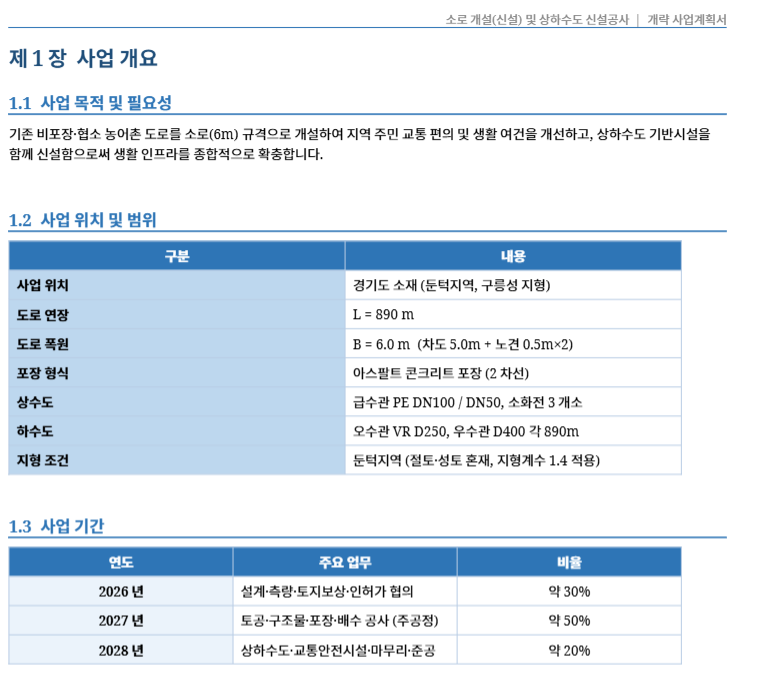
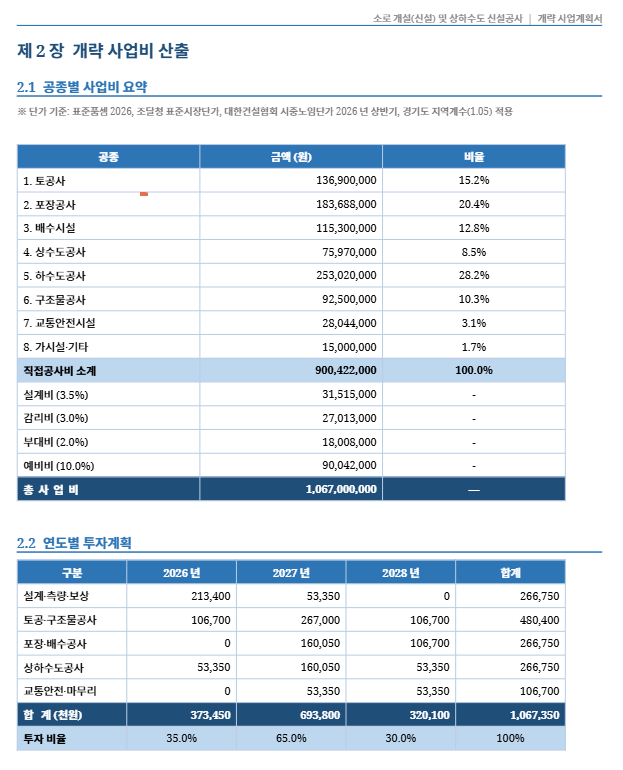
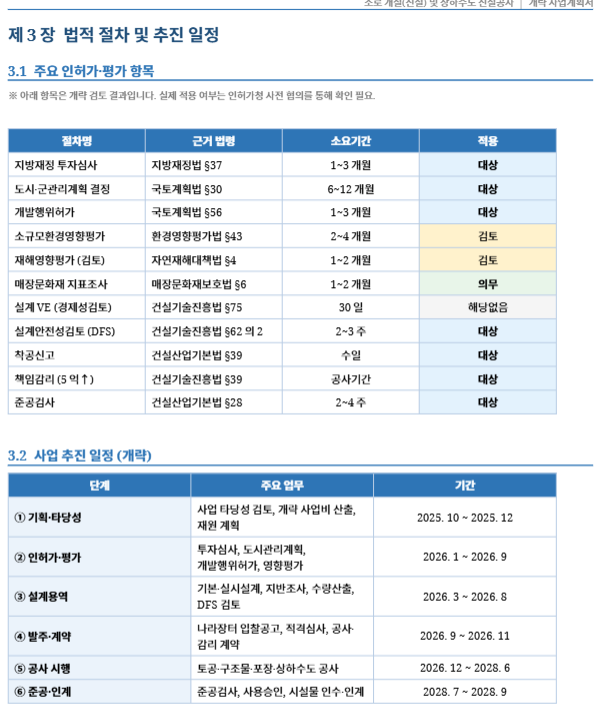
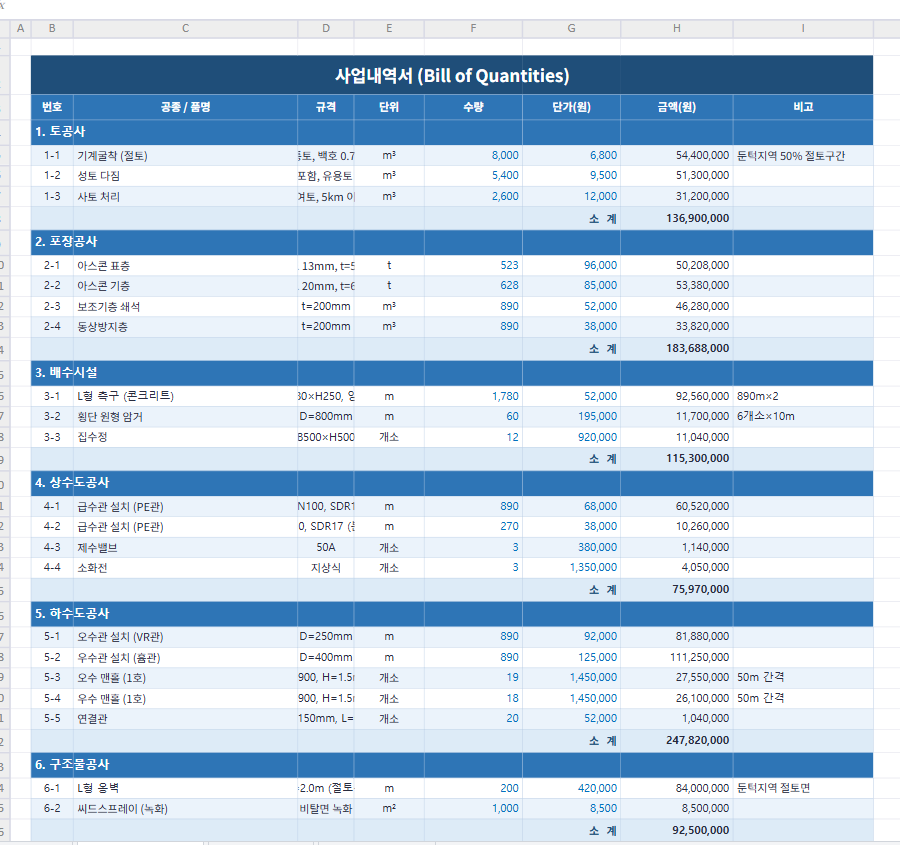
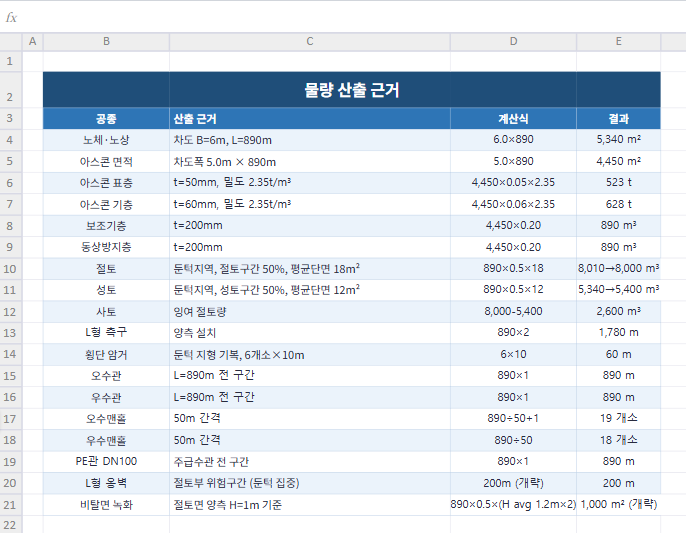
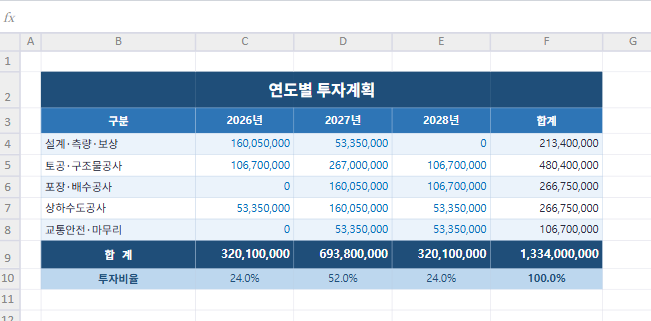
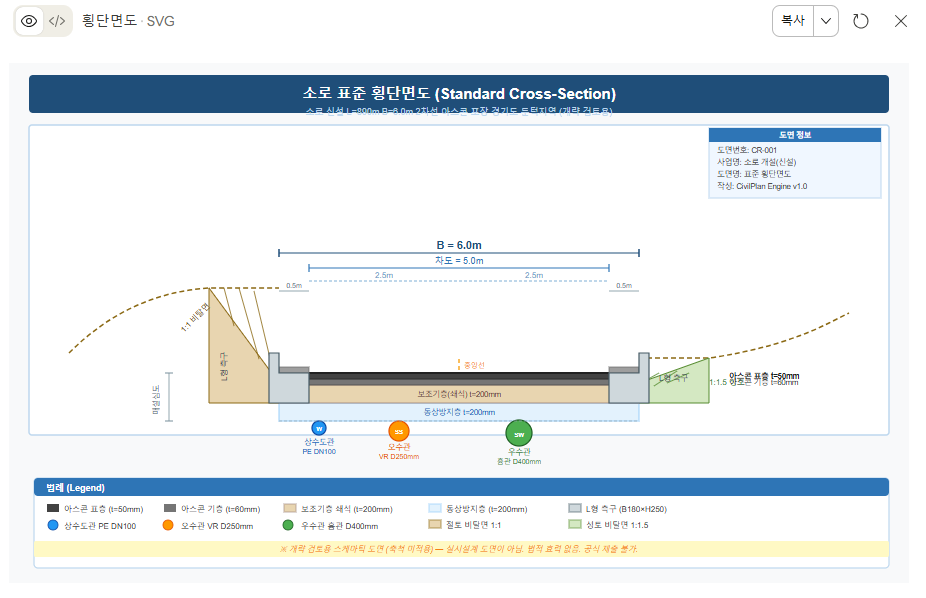
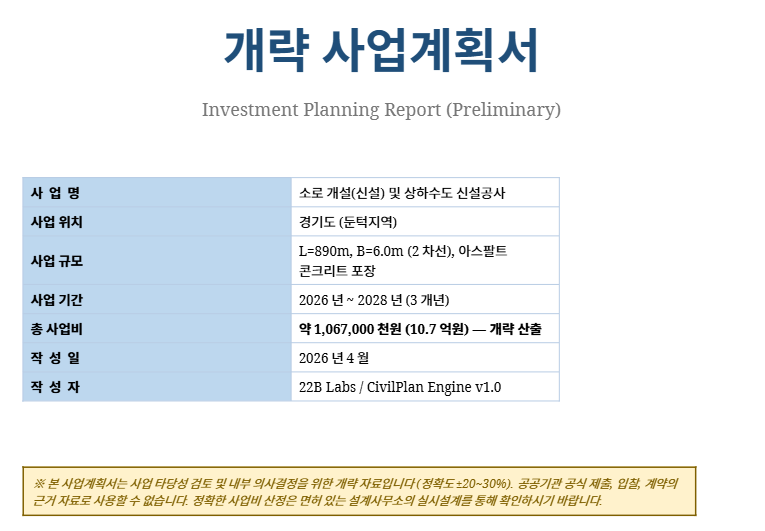
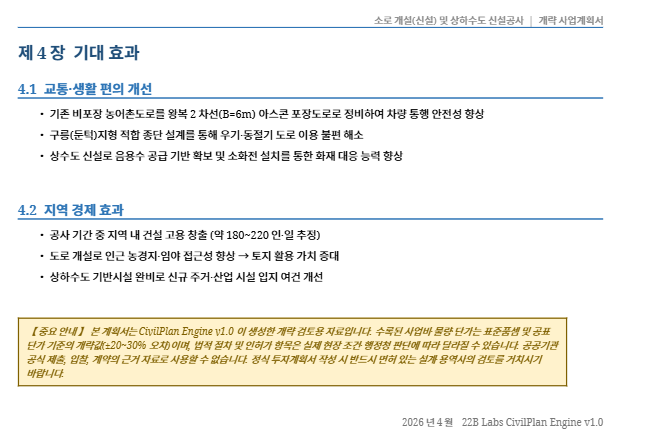
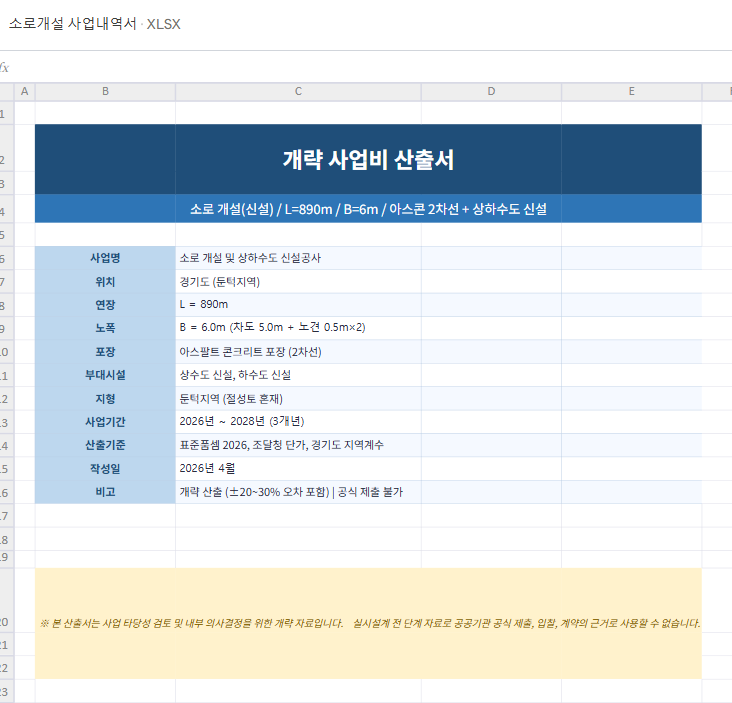
Everything below was automatically generated from: "Plan a new local road L=890m, B=6m, Gyeonggi Province, hilly terrain."
Project cost summary — breakdown by trade
⑤ Cost Summary — 8 trade costs + design/supervision/contingency fees. Total project cost auto-calculated.
Project timeline
⑥ Project Timeline — Permits, design, procurement, construction, completion phases auto-scheduled.
Comprehensive view of all outputs
⑦ Comprehensive View — Cost, quantities, procedures, and schedule in one unified view.
Output examples — BOQ Excel, investment report DOCX, SVG drawings
⑧ Output Examples — BOQ Excel · Investment Report DOCX · SVG Drawings, all auto-generated.
Document generation — Word investment report
⑨ Document Generation — Investment report DOCX with cover, overview, costs, legal procedures, and expected effects.
Detailed workflow — per-tool inputs and outputs
⑩ Detailed Workflow — 19-tool call sequence with inputs and outputs.
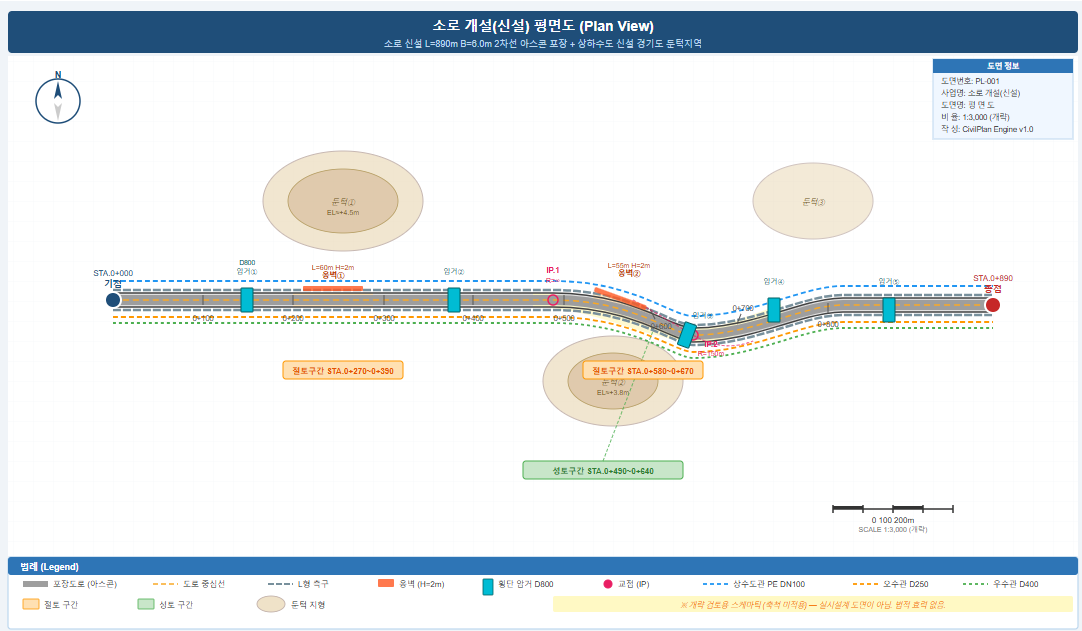
Auto-generated plan view — 890m road alignment
⑪ Plan View — 890m road alignment SVG auto-generated. Stations, intersection points, cut/fill zones, utility pipe routes placed automatically.

19 MCP Tools

💰
Preliminary Cost Estimate
Korean standard specs, PPS market prices, wage rates. ±20–30% accuracy.
📋
Legal Procedure Guidance
16 ministry guidelines built-in. Investment review, permits, EIA auto-identified.
📊
BOQ + Investment Report
Auto-generate Excel BOQ and DOCX investment report.
🗺️
Land Info Query
Address → zoning / BCR / FAR / land price auto-query.
📐
Drawing Output
Cross-section + plan view SVG. DXF (AutoCAD) in v1.1.
📈
Feasibility Analysis
IRR, NPV, DSCR, sensitivity analysis. (v1.1)

Why Existing Approaches Fall Short

ApproachTimeCostLimitation
Consulting firm1–4 weeksMillions of KRWOnly for well-funded organizations
Manual preparationDays to weeksStaff hoursRequires deep expertise, error-prone
Estimating softwareHoursPaid subscriptionDetailed design phase only
CPM (MCP)MinutesFreeNatural language, AI handles everything

How It Works

# In Claude Desktop or ChatGPT: "Plan a new local road, L=890m, B=6m, Gyeonggi Province, hilly terrain, 2026–2028." → Preliminary cost estimate → BOQ Excel auto-generated → Investment report DOCX auto-generated → Plan view + cross-section drawings → Legal procedure checklist
💡 Connect to Claude Desktop — Add to claude_desktop_config.json and restart:

{ "mcpServers": { "cpm": { "command": "mcp-remote", "args": ["http://127.0.0.1:8765/mcp"] } } }
⚠️ Disclaimer
All CPM outputs are preliminary estimates (±20–30%) for internal review only. Cannot be used for official submissions, bidding, or contracts.

Get Started on GitHub

MIT License · Completely Free · 19 MCP Tools · Python
Works with Claude Desktop + ChatGPT

🔗 View on GitHub
#CPM #MCP #CivilEngineering #ProjectPlanning #OpenSource #Claude #ChatGPT #22BLabs #The4thPath
22
22B Labs · The 4th Path GitHub: sinmb79 · the4thpath.com
The 4th Path: ⟨H⊕A⟩ ↦ Ω — Human × AI → a better world.
더 읽기